
Approving Funds for the ICO
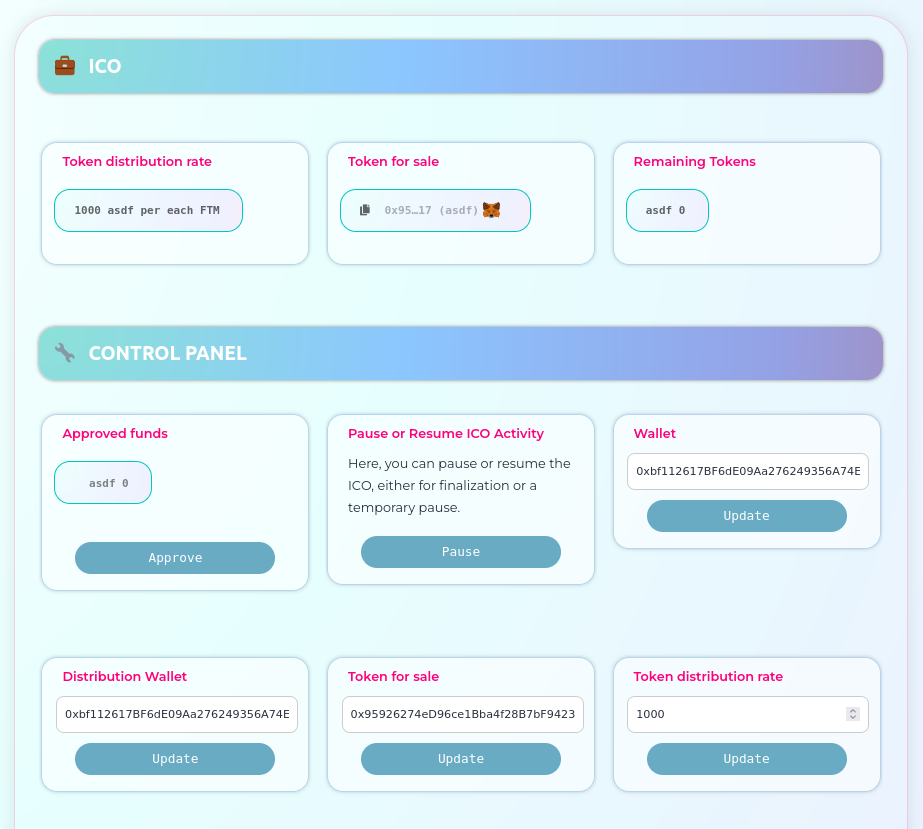
Once you deploy your ICO, you will see the ICO page with the following attributes:
Token Distribution Rate
Tokens for Sale
Remaining Tokens
If you are logged in as the ICO owner, you can also view and modify the parameters of the ICO individually:
Approve Funds
You can approve any token amount greater than or equal to zero. If you approve zero tokens, the ICO will be terminated until you approve additional funds.
Pause / Resume
You can pause or resume the ICO by clicking the Pause button, approving the transaction in Metamask. Later, you can resume the ICO using the same process.
Wallet
This is the address that will receive the funds from ICO contributions. You can change it at any time if needed. To update, simply set the new value and click 'Update.' Then, approve the transaction in Metamask.
Distribution Wallet
This is the address that holds the funds to be offered for sale in the ICO. You need to approve funds from this account. You can also change this account at any time, but you must approve funds from the new account for the ICO to have funds. To update, set the new value, click 'Update,' and then approve the transaction in Metamask.
Tokens for Sale
If the ICO hasn't started yet, you can change the token for sale. Once the ICO receives a contribution, this cannot be changed. To update, set the new value, click 'Update,' and then approve the transaction in Metamask.
Token Distribution Rate
This is the amount of tokens contributors will receive for each Ether or native coin sent. You can set a decimal or integer rate. Once the ICO receives a contribution, this cannot be changed. To update, set the new value, click 'Update,' and then approve the transaction in Metamask.
ICO Buying tokens